Local Weather: Live Forecast
- 4.6
- Rating
- 10.00M
- Installs
- Free
- Price
 Analysis by App-foxy
Weather apps are easy to install and surprisingly hard to keep. During the first few days, almost any clean forecast screen feels useful; after a few weeks, I only keep one if it helps me make faster decisions without demanding attention. Local Weather: Live Forecast made a good first impression because it focuses on the practical question I ask most often: what should I expect where I am, and how should that change my plans? It is a free weather app from WINDWAVE LIMITED, rated for Everyone, and it has already attracted a large audience, with more than ten million installs and an average score of 4.6 from roughly fifty-nine thousand ratings.
That popularity is not, by itself, a reason to trust every forecast or leave the app installed forever. My view is more useful than that: this is a convenient everyday weather companion for people who want local conditions presented simply, but it is not automatically the best choice for serious outdoor planning, highly detailed meteorology, or anyone who dislikes optional purchase prompts. Its lasting value depends on whether its straightforward presentation fits your routine.
What the first week feels like
My first week with Local Weather: Live Forecast was mainly about reducing small moments of uncertainty. Before leaving home, I could check whether a light jacket made sense, whether a walk would be comfortable, or whether an outdoor errand deserved a change of timing. Those decisions sound minor, but they are exactly where a weather app earns its place. I do not need a long explanation each time I open it; I need a readable answer quickly.
You May Also Like

 Blood Strike: 2.5 Anniversary
Blood Strike’s Loadouts Turn Every Drop Into a Tactical Gamble
A close look at Blood Strike’s custom loadouts: how fast access to signature weapons reshapes its battle royale rhythm, rewards preparation, and narrows the gap between fights.

 Pandora - Music & Podcasts
Pandora’s Music Is Easy to Start, but Harder to Recover
Pandora’s strength is its low-effort path from a seed to a station. Its weak spot is how much confidence it asks you to place in connection, setup, and quiet recovery.

 8 Ball Pool
 Is Built on Rivalries, Rematches, and Routine
A close look at the rivalries, rematches, shared routines, and unanswered safety questions that turn a quick pool match into a persistent mobile community.

 Samsung Music
’s Quiet Strength Is Playing What You Already Own
Its reach comes less from spectacle than from dependable access to a personal library. That simplicity is both the app’s strongest retention engine and its ceiling.

 AccuWeather: Weather Radar
AccuWeather Review: A Quick, Clear Forecast for Everyday Decisions
For everyday plans, the best forecast is the one you can understand quickly. AccuWeather makes rain timing, radar, and local conditions easy to act on, with a few trade-offs.

 Hill Climb Racing
Why Hill Climb Racing Still Turns Crashes Into One More Run
A tiny car, a bumpy hill and one more upgrade: Hill Climb Racing keeps resurfacing because its simple chaos makes every near-miss feel personal.
More From Our News Desk
View All News


The app’s identity is clear from its short description, “Local Weather,” and its broader purpose is local forecasting rather than a news feed or a general climate reference. That makes it approachable for someone who has never used a dedicated weather tool beyond the phone’s built-in option. The age rating of Everyone also makes it an uncomplicated choice for a household device where several people may check conditions.
I found the strongest early appeal in the habit of checking before transitions: leaving for work, collecting a child from school, taking a dog outside, or deciding whether laundry should go out. A forecast is most useful when it is connected to an action. Reading it without changing anything is less valuable than using it to pack an umbrella, move a run, or add time for a cold commute.
One practical tip is to judge the app during ordinary, uninteresting weather rather than only during a dramatic storm. A weather tool can look impressive when conditions are changing quickly, but most of its life is spent helping with routine choices. If the local view is easy to understand on a normal morning, that is a more meaningful test of whether it deserves a place on your phone.
Useful for quick decisions, not just forecast browsing
Compared with a traditional television forecast, this app is more convenient because it puts the information in the context of your own immediate plans. Compared with a general search engine, it avoids making you repeat the same location question. And compared with many built-in weather panels, it can feel more intentional: you open it because you want weather, not because the information happens to be sitting beside other phone widgets.
That does not mean it replaces every alternative. A built-in weather service may be better if you want the fewest apps and no separate routine. A specialist weather service may be preferable when radar, storm tracking, aviation details, marine conditions, or highly technical charts matter. Local Weather: Live Forecast sits in the middle: more focused than a casual glance at a notification, but less suited to users who want a full meteorological workstation.
The first-week experience also depends on how often you change places. For a person who spends most days in one town, a local forecast can become a dependable reference point. For commuters, travelers, delivery workers, or people moving between several neighborhoods, the value comes from checking the correct location before acting. A forecast that is useful for home may be misleading for a destination a long drive away, so I would make location checking part of the routine rather than assuming “local” always means “where I am going.”
Where the free model fits
The app is free to install, which makes trying it low-risk. It also includes in-app purchases ranging from $0.99 to $39.99 per item. That range matters because “free” does not necessarily mean every convenience remains free forever. I would start by using the core experience for several days before paying for anything. If the basic forecast already answers your daily questions, a purchase may not improve your life enough to justify it.
My advice is especially relevant for occasional users. If you only check weather before a holiday or an outdoor event, the free entry point is attractive, but you should not buy an optional feature simply because it appears at the moment you are curious. Regular users can make a better decision by asking whether the paid addition removes a repeated annoyance, not whether it sounds more advanced.
The current version is 1.9.0, and the app runs on Android 7.0 or later. That broad compatibility is helpful if you keep an older phone or share a device with someone who does not upgrade often. It also means the app is not limited to people with the newest hardware. Still, an older operating system can affect the overall phone experience, so I would judge responsiveness on the actual device rather than assuming compatibility guarantees identical comfort everywhere.
Why it can remain useful month after month
After the novelty fades, the app’s main strength is repetition. Weather is not a one-time problem. I may need the same answer every morning, before an evening appointment, and again when plans change unexpectedly. A useful weather app becomes almost invisible in a good way: it supports a decision, then gets out of the way.
For me, the best recurring use case is planning around uncertainty rather than chasing perfect precision. If I am deciding between walking and driving, preparing clothes for a full day, or choosing when to take a break outside, a clear local outlook is enough to improve the decision. The app does not need to become a hobby. In fact, it is more successful when I can check it briefly and return to what I was doing.
Families may also find value in a shared checking habit. One person can look before the school run, another before an evening shift, and another before a weekend activity. Because the app is aimed at local weather rather than a narrow professional audience, it is easier to recommend to someone who wants practical information without learning weather terminology.
There is a useful distinction between “accurate enough for planning” and “certain enough to guarantee an outcome.” I would use this app to decide whether to carry a raincoat, not to promise that an outdoor event will remain dry. Forecasts change, local conditions vary, and a small difference in location can matter. The more costly the mistake, the more sensible it is to compare the app with an official warning or a specialist source.
A routine that avoids overchecking
One of my more useful habits was to check at decision points instead of refreshing constantly. A morning glance can shape clothing and transport, while a second check before a time-sensitive outdoor plan can catch a meaningful change. Repeatedly opening a weather app every few minutes rarely creates better judgment; it mostly creates noise.
This is also where the app can earn lasting space after the initial curiosity. If its local presentation is quick enough, it supports a two-check routine without becoming another attention trap. I would place it alongside the apps I use for daily planning, but I would avoid turning every forecast variation into a reason to change plans. The app is a tool for proportionate decisions, not a substitute for judgment.
A second tip is to compare the forecast with what you actually experience for a couple of weeks. Notice whether the temperature guidance, precipitation expectations, and timing feel useful in your area. This is not about keeping a scientific scorecard; it is about learning whether the app’s local information matches your normal decisions. If it repeatedly leaves you surprised, another service may fit your location better even if this one looks cleaner.
The developer, WINDWAVE LIMITED, has positioned the product for broad everyday use rather than a narrow group of weather specialists. That is a sensible direction, but it also sets a clear expectation: the app’s value should come from consistency and clarity. If you need to interpret several layers of weather data, a simpler local forecast may eventually feel limiting.
When competing options are better
The usual alternative is the weather feature already included with a phone. That option wins on convenience, especially for someone who wants a glance from the home screen and does not want another app to maintain. Local Weather: Live Forecast becomes more appealing when its dedicated focus makes checking conditions feel clearer or more comfortable than the default tool.
Another alternative is a service built around severe-weather alerts or detailed maps. That kind of app is the better choice for hikers, sailors, pilots, event organizers, and anyone whose safety depends on more than a simple local outlook. I would not use this app alone for a high-risk trip simply because it is popular. Popularity indicates broad appeal, not suitability for every consequence.
There is also a difference between local usefulness and travel usefulness. Before a short trip, I would check the destination directly and then check again close to departure. A home-focused habit can create false confidence when conditions change across a region. This is a small workflow adjustment, but it prevents one of the easiest mistakes with any local weather application.
Maintenance, friction, and the reasons people stop opening it
The maintenance burden is fairly light in concept: open the app when needed, keep the relevant location in mind, and decide whether optional purchases are worthwhile. The heavier burden is psychological. Weather apps can become repetitive, and repetition exposes every small irritation. A screen that felt fresh on the first day may feel unnecessary after a month if it does not save time.
I would also be cautious about treating every prompt as part of the core weather experience. Since purchases are available, some users may feel pressure to explore paid options before they know whether the free version is enough. My approach is to use the app during normal routines first, then make a deliberate decision. If an upgrade does not solve a specific recurring problem, I would leave it alone.
Another source of fatigue is forecast anxiety. People who already check conditions compulsively may find that a dedicated weather app encourages more checking rather than better planning. In that case, a simple built-in widget may actually be healthier because it provides enough information without inviting repeated browsing. The best weather app is not necessarily the one with the most things to inspect; it is the one that supports the right amount of attention.
Location changes can also create friction. If you travel, move between work and home, or plan activities elsewhere, pause before reading the forecast and confirm that the place you are viewing matches the decision in front of you. This is a non-obvious but important trade-off: a local app can feel reassuringly personal while still being wrong for the next place on your schedule.
For older phones, compatibility with Android 7.0 or later is reassuring, but practical comfort still depends on the device. I would keep the app only if opening it feels faster than using a browser or the phone’s existing weather panel. A compatible app that interrupts your routine is not truly convenient.
Who should keep it installed
I think it is a good fit for someone who wants a dedicated, approachable local forecast and makes frequent everyday decisions around temperature or changing conditions. It is particularly sensible for people who prefer a focused weather app over searching the web, and for households that want an Everyone-rated option that does not assume technical knowledge.
I would skip it, or at least compare it carefully with alternatives, if you need professional-grade weather interpretation, specialized warnings, or highly detailed tools for outdoor safety. I would also skip it if your phone’s built-in weather service already gives you everything you need and you strongly prefer having fewer apps. There is no benefit in maintaining a second weather app merely because its install count is large.
The audience size is still useful context. With over ten million installs, the product is clearly not an obscure experiment, and its 4.6 average from about fifty-nine thousand ratings suggests that many people find the general experience satisfactory. I read those figures as evidence of broad usability, not as a promise that every location, device, or personal workflow will feel equally good.
My long-term verdict
Local Weather: Live Forecast earns lasting space when I use it as a quiet decision tool rather than an endlessly refreshing forecast screen. Its strongest qualities are accessibility, a clear local purpose, broad device support, and a free starting point. Those qualities matter more over time than a flashy first impression because they fit repeated routines: getting dressed, planning transport, timing an errand, or deciding whether an outdoor plan needs a backup.
Its weaknesses are equally practical. A general local forecast may not satisfy users who need specialist weather information, and the presence of in-app purchases means I would avoid making assumptions about what every convenience costs. The app can also become redundant if the phone’s default weather feature already meets your needs. For travelers and safety-critical activities, I would pair it with a more specialized source rather than relying on it alone.
My recommendation is to give it a fair trial across ordinary days, not just one dramatic weather event. Use it before real decisions, check the destination when you are traveling, and notice whether it reduces uncertainty without encouraging constant checking. If it becomes part of a simple morning-and-before-plans routine, it has earned its place. If you keep opening it out of habit but gain no clearer decision, uninstalling it is reasonable.
In the end, this is a practical weather app rather than a replacement for every weather service. WINDWAVE LIMITED has made something broad and approachable, and the free entry point makes testing straightforward. I would recommend it to friends who want local conditions without unnecessary complexity, while being honest that serious outdoor users and minimalists may prefer another option. The real test is not how impressive it feels on day one, but whether it still saves you a few useful decisions a month later.
FAQs for Local Weather: Live Forecast
01What features does Local Weather: Live Forecast offer?
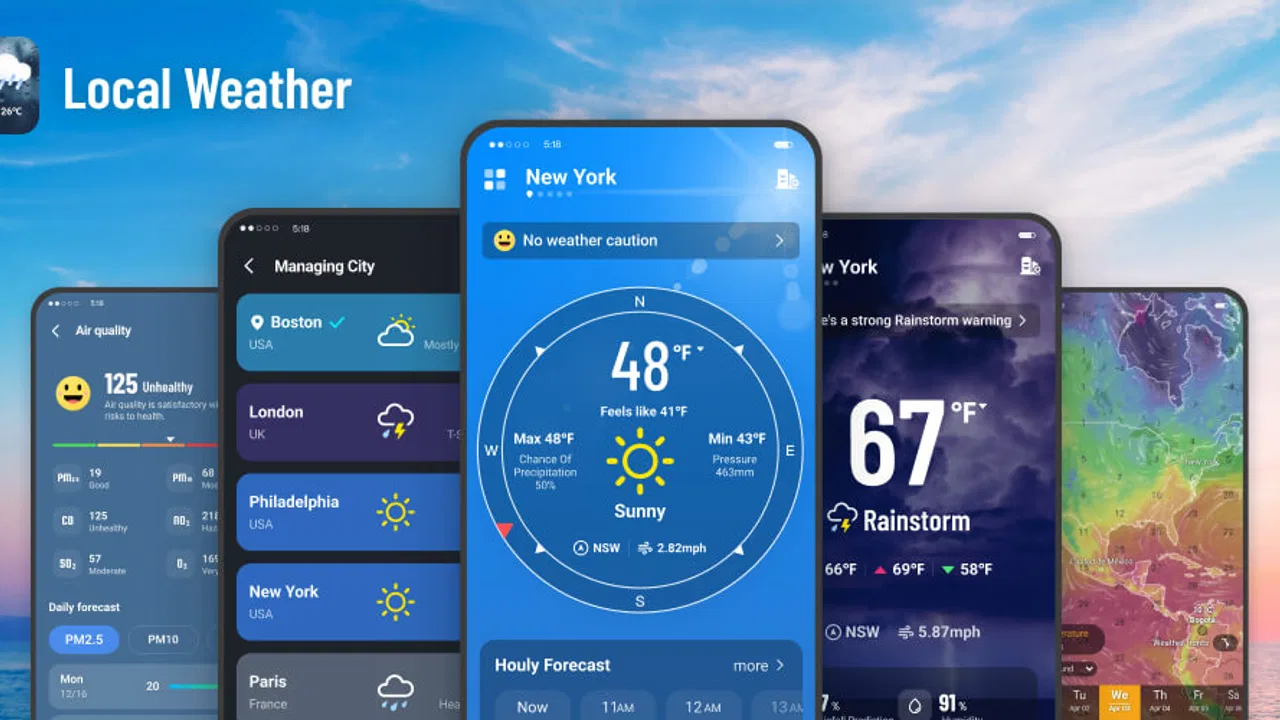
Local Weather: Live Forecast provides real-time updates on weather conditions, including temperature, humidity, and wind speed. It offers detailed forecasts for the next 7 days, severe weather alerts, and radar maps. The app also includes widgets for quick access and customizable notifications to keep you informed.
02Is Local Weather: Live Forecast accurate in predicting weather changes?
Yes, Local Weather: Live Forecast uses advanced meteorological data and algorithms to ensure high accuracy. It sources information from reputable weather stations and satellites. Users generally report reliable predictions, though, like any weather app, it is subject to occasional discrepancies due to rapidly changing conditions.
03How user-friendly is the Local Weather: Live Forecast app?
Local Weather: Live Forecast is designed with user-friendliness in mind. It features an intuitive interface with easily accessible information. The navigation is straightforward, making it simple for users of all ages to find the data they need quickly. Customizable settings allow for a personalized experience.
04Does Local Weather: Live Forecast consume a lot of data or battery?
Local Weather: Live Forecast is optimized to minimize data and battery consumption. It updates in the background at set intervals, which can be adjusted in the settings. While it uses GPS for precise location tracking, users can manage these settings to conserve resources based on their preferences.
05Is Local Weather: Live Forecast available for free, and are there any in-app purchases?
Local Weather: Live Forecast is available as a free download with basic features. It offers a premium version through in-app purchases, which unlocks additional features like ad-free usage, advanced radar maps, and extended forecast details. This allows users to choose a plan that best suits their needs.
Pros
- Accurate and up-to-date weather forecasts.
- User-friendly interface with intuitive design.
- Customizable alerts for severe weather.
- Detailed hourly and weekly forecasts.
- Supports multiple locations for quick access.
Cons
- Contains ads that can interrupt user experience.
- Requires internet for real-time updates.
- Battery consumption can be relatively high.
- Limited free features; premium upgrade needed.
- Some users report occasional app crashes.

Local Weather: Live Forecast
Gallery